You've probably got a half-finished journal entry open right now. The problem isn't finding words: it's figuring out what those words mean over time. A good app gets thoughts out of your head. The best AI journaling apps go further, because they connect today's entry to last week's frustration, last month's breakthrough, and the patterns you keep missing. That's why continuity matters more than clever prompts, and why the strongest tools now build around memory, follow-up and recurring themes instead of acting like a generic chat window. If you want a quick primer on the manual side of the practice, start with these prompt journal techniques, then come back and compare the apps that help you build on what you already wrote.
1. Sintera
Sintera treats journaling as a system that runs over months, not a one-off conversation. You type or dictate, use a coach to expand a thin draft, then finalize the entry so it joins a durable reflection archive. In testing, that made it good at connecting older entries to what you are writing now.
A lot of AI journaling tools can summarize what you just wrote. Sintera earns its place when the same emotional loop keeps showing up, and you need the app to show where it began and how it keeps coming back. The deep insights are the strongest part of the app. They pull contradictions, blind spots and recurring patterns out of your own wording, instead of handing you generic advice.
The result reads less like a chatbot and more like a mirror: uncomfortable some days, usually accurate.
Practical rule: if you want an AI journal to change your behavior, don't pick it for quick entry capture alone. Ask one thing of every app you try: does it help you return to old entries, see what repeats, and act on the pattern?
Sintera also handles the smaller pieces that support recall. Finished entries get an emotion breakdown, a memorable line and custom artwork, so older reflections are easier to revisit and compare. For now it is web-only, with native iOS and Android apps still on the way. If you journal mostly on a phone, that means waiting for a fuller workflow.
Why it works
- Cross-entry continuity: follow-up prompts come from your own words, so the next reflection stays tied to the last one.
- Coach-guided depth: you can push a shallow entry further without losing your voice.
- Privacy boundaries: writing is encrypted in transit and at rest, and the product is built for reflection, not therapy.
- Transparent pricing: there is a 7-day trial, then $44.99 every 3 months or $99/year, which works out to $8.25/month on the annual plan.
If your main goal is spotting recurring stress patterns, self-sabotage or the same emotional loop in different clothes, Sintera is the clearest pick. Read the broader comparison of the best journaling apps if you want to see how its continuity-first approach sits next to other options.
2. Day One
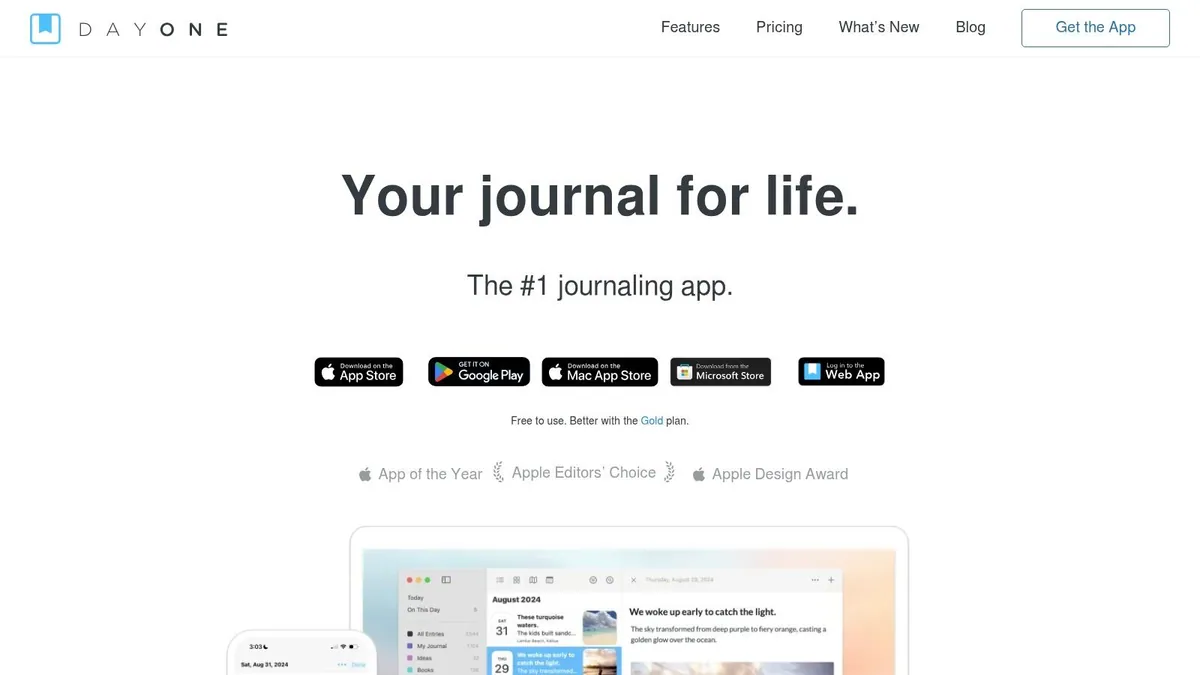
Day One is the safest recommendation for people who want a polished journal first and an AI layer second. Its real strength is durability: the app feels like a long-term archive, with media capture, search, export, maps, calendar views, shared journals, and it runs on iOS, Android, Mac, web and Windows.
The AI features sit on top of that foundation instead of replacing it. AI Daily Chat, entry summaries, title suggestions and Go Deeper prompts help when you want a nudge, but Day One still behaves like a classic journaling system. If you already trust your own workflow and only want help reflecting on what you wrote, that is the right trade.
The main trade-off is straightforward: the best AI functions sit on the top tier, and usage limits apply. Will you lean on AI every day, or only when you get stuck? Day One does explain its AI usage clearly, which more tools should do, but this is still not the most generous setup for heavy AI-dependent journaling.
Best for
- Archive-minded writers: people who care about preserving a deep, searchable journal history.
- Media-heavy journaling: anyone who mixes photos, audio, drawings and text.
- Habit plus reflection: people who want structure without losing the feel of a classic diary.
Website: Day One
3. Journey
Journey sits in the middle of the market, and that is a useful place to be. It runs on Android, iOS, Mac, PC, Linux and web. So if you journal on two or three devices, you don't have to rebuild your routine around one operating system.
The AI layer, Odyssey AI, is more conversational than analytical. It works best when you want chat-style guidance, Q&A over entries, and a bit of structure from templates or coach programs. If you like the feeling of being guided through a session, Journey does that well.
Its main advantage is the way you pay for it. You can buy a one-time platform license or take a cross-platform membership, which helps when you are not sure how much to commit. Lower tiers come with AI question quotas and storage caps, so the app can feel tighter than its device list suggests.
For buyers comparing the best AI journaling apps, Journey is often the practical middle ground. It doesn't reach for the deepest insight engine or the strictest privacy, but it is mature, it works everywhere, and it lets you take your entries with you.
Journey makes sense when your priority is reaching your journal from any device, not the deepest reflection.
Website: Journey
4. Diarly
Diarly is for Apple users who want a light journal that doesn't feel bloated. It runs on Mac, iPhone, iPad and Watch, and the interface stays on the core job of getting thoughts down cleanly and privately. Diarly feels closer to a native Apple utility than to a bulky self-help platform.
The AI Assistant helps with prompts and ideas, while the optional AI+ tier covers heavier tasks like image-to-text and advanced transcription. That split matters, because not every entry needs the same amount of machine help. Some days all you want is a nudge. Other days you need to turn photos or rough audio into usable text.
Diarly also takes privacy seriously, with iCloud sync and end-to-end encryption. That will appeal to anyone who is careful about where their writing lives. The trade-off is the platform: it only runs on Apple devices, and features can arrive on one device well before the others.
If you journal inside a tight Apple workflow and want simple AI support without a noisy interface, Diarly is one of the cleanest options.
Website: Diarly
5. Stoic
Stoic blends journaling with mental fitness, so it feels less like a diary and more like a guided daily practice. That suits you if you want prompts, mood tracking and a set rhythm instead of a blank page. The newest AI features run on the device on recent iOS versions, which keeps sensitive entries off a server.
What makes Stoic practical is the balance between habit and insight. You record how you feel, then you work through guided journaling flows that fit into a wider stoicism-inspired routine. The dynamic prompts and adaptive insights matter most if you want reflection tied to behavior.
The limits come down to platform and price. Newer AI features land on iOS first, and Premium or AI Premium pricing varies by store and region, so a clean comparison across markets is hard. The privacy side still stands out, because AI that runs on your phone exposes less of what you wrote.
Website: Stoic
6. Mindsera
Mindsera is built for people who want their journal to behave like a thinking partner. It leans on CBT and ACT-style framing, so the app is less about passive reflection and more about structured reframing, which means catching a thought and turning it around. It fits founders, knowledge workers and anyone who likes seeing emotion, bias and thought patterns named out loud.
The conversational mode and Go Deeper reflections help when you want the app to push back a little. Minds, the app's AI personas, add variety, and voice journaling plus handwritten scanning on the paid tier cover different entry styles. Mindsera doesn't stop at collecting thoughts: it pushes them toward an interpretation.
The trade-off is that the most useful features sit behind the paid Genius plan. What works on mobile also shifts over time, so expect the product to keep moving rather than sit still. That is good news if you like active development, and less good if you want something settled.
Mindsera belongs on your shortlist when you want journaling to support better decisions and self-reframing, not just mood capture.
Website: Mindsera
7. Wysa
Wysa is not a dedicated diary app, and that is exactly why some people choose it. The journal sits inside a wider mental health product with 24/7 AI support, self-monitoring, mood tracking and optional human coaching. If you want journaling tied to structured self-help, Wysa fits better than most pure journaling tools.
The app's strength is credibility: its content is evidence-informed and carries research citations, and its documentation on personal data is more thorough than most consumer apps in this category. It also has enterprise and health integrations, so it was built for more than casual note-taking.
The real limitation is what the writing itself feels like. Because the journal lives inside a mental-health app, it never feels as clean or as diary-like as the best standalone products. You also need Premium for the full content library, so the free version won't show you everything the platform can do.
Website: Wysa
8. June
June solves the problem most journaling apps never quite fix: starting. Instead of asking you to face a blank page, it calls you each evening, has a short conversation, and turns that into one clean daily entry. The phone call is what builds the ritual.
The memory across days is the part that matters. Plenty of voice tools can catch a thought, but June tries to keep the thread going, so tonight's conversation isn't cut off from last night's. It stores your diary in iCloud with no copy on the company's servers, which matters if you want privacy without giving up convenience.
The downsides are practical: it is iOS-only, it is still a young indie product, and the pricing shows up in the app rather than somewhere you can compare it upfront. The identity is clear all the same, a low-friction nightly capture with continuity and privacy at the center.
If your biggest obstacle is sitting down to type, June is one of the most natural of the best AI journaling apps to try.
Website: June
9. DayTape
DayTape is the most privacy-forward voice journaling app on this list. It runs entirely on the device with Apple Intelligence, works offline and needs no account. Nothing leaves your phone, which is easy to trust if cloud storage for personal notes makes you uneasy.
The flow is deliberately simple, and DayTape does not try to be anything else. You record a voice note, get a one-sentence summary and a list of action items, then read a weekly recap of themes and follow-ups. It fits people who don't want a heavy reflective system, just a clean way to catch a thought and see the week in miniature.
Its limits are the same choices that keep it focused. It needs an iPhone with the right OS version, and it makes no attempt to be cross-platform. There is no web companion and no Android version, so this is an Apple-only option for people who put offline privacy ahead of flexibility.
DayTape works best when the main goal is fast voice capture with private processing, not deep narrative analysis.
Website: DayTape
10. Dayarc
Dayarc picks one simple rhythm and sticks to it. You get two short AI-guided conversations a day: one in the morning to set your intent, one in the evening to look back, with the morning goals carried into the evening check-in. The app feels organized without turning into homework.
The design choice here is restraint: Dayarc is meant to be put down, which means no streak pressure and no heavy gamification. If you are tired of productivity apps turning reflection into a scoreboard, that is a real advantage.
It is still an early-access product, so the roadmap is unfinished, and it is iPhone-only for now. That won't suit everyone, and it doesn't have to. The AM/PM structure works for people who want fewer choices and more consistency, because it gives each day a shape before you sit down to write.
Dayarc is one of the cleaner options if your journaling goal is staying aligned with your intentions, not building a massive archive.
Website: Dayarc
Top 10 AI Journaling Apps, Side-by-Side Comparison
Product | Key features | UX & quality | Privacy & continuity | Target & price |
|---|---|---|---|---|
Sintera | Cross-entry AI insights; text and voice; coach deepening; finalize step; quote and artwork | ★★★★☆, contextual insights, polished web UI | Encrypted in transit and at rest; server-side AI; continuity and re-entry prompts from your words | Reflective journalers, founders, coaches • 7-day free trial, then $44.99/quarter or $99/yr |
Day One | AI daily chat, summaries, rich media capture, templates | ★★★★☆, mature, polished multi-platform ecosystem | End-to-end encryption, multi-device sync, archiving | General journalers, archivists • Freemium; top tier unlocks the best AI |
Journey | Odyssey AI chat, cloud sync, templates and coach programs | ★★★★, broad device support (Android/PC/Mac/web) | Cloud processing; migration tools; AI quotas on lower tiers | Cross-platform users • One-time per platform or membership |
Diarly | AI assistant, voice-to-text, markdown, iCloud sync | ★★★★, lightweight Apple-native UX | iCloud plus end-to-end encryption; Apple-only ecosystem | Apple users who value privacy • One-time or subscription; AI+ optional |
Stoic | On-device AI reflections, guided journaling, mood tracking | ★★★, mental-fitness focused, regular updates | On-device AI reduces server exposure; iOS-first features | Stoicism-inspired routine users • Premium/AI pricing varies by store |
Mindsera | CBT/ACT frameworks, emotion and bias detection, AI personas | ★★★, coaching-oriented, insights you can act on | Cloud AI; some advanced features behind a paid tier | Founders, knowledge workers, coaching clients • Freemium; "Genius" paid plan |
Wysa | 24/7 AI chatbot, journaling modules, optional human coaching | ★★★★, clinically informed, research-backed | Enterprise integrations; PII redaction policies | Mental-wellbeing seekers, enterprises • Freemium; premium for full library |
June | Nightly automated call, voice capture, one entry a day, memory | ★★★★, ritual-focused, very low friction | iCloud storage (no vendor server copy) for privacy | Nightly ritual on iOS • iOS-only; pricing shown in-app |
DayTape | 100% on-device AI (Apple Intelligence), voice summaries, weekly recaps | ★★★★, ultra-low friction voice journaling | Fully on-device; offline; no account required | Privacy-first voice journalers (iOS) • One-time purchase; requires iOS 26+ |
Dayarc | AM/PM check-ins, goal continuity, daily summaries and trends | ★★★, simple AM/PM routine, low decision fatigue | Early-access product; iPhone-only for now | AM/PM rhythm on iOS • Early access; iOS only |
From Daily Entries to Deeper Self-Awareness
The best AI journaling app is the one that matches the way you reflect. If you want a strong archive and a polished ecosystem, Day One is hard to ignore. If you want a coaching-style journal with a framework behind it, Mindsera has a clear angle. If privacy is your top concern, Stoic, DayTape and June each make different trade-offs that may fit your comfort level better than a cloud-first tool.
The deeper question is whether the app helps you learn from your own history, and that is where continuity matters most. A journal that revisits older entries, connects contradictions and surfaces recurring emotional loops beats one that only gives you a nicer way to type. Sintera is built around that idea, which is why it fits people who want their writing to show them something, not just hold more of it.
The market is moving the same way, as far as I can tell from this list: several of these apps are new, and the ones with a clear angle are building for retention and recurring use rather than one-time capture. The products that keep improving are the ones that help you return, reflect and reuse your own words over time.
If you have been using journaling apps as temporary outlets, pick one that gives your entries a second life. And if continuity, pattern detection, and deep insights are what you're after, how to voice journal on PC is a useful next step for building a better workflow around reflection.
Sintera is built for people who want their journal to do more than store thoughts. It helps you write, deepen, finalize and revisit entries, so the patterns that keep repeating stop hiding in older reflections. If that is the kind of journaling you want, visit Sintera and see what your own entries have been saying.